
Migrating from Salesforce to HubSpot: A RevOps-First Approach
A CRM migration isn’t a data project. It’s a revenue operations project. Here’s how to move from Salesforce to HubSpot without losing productivity, breaking your reporting, or making your sales team mutiny.
Let’s get the uncomfortable truth out of the way first: most CRM migrations fail not because the technology doesn’t work, but because nobody treated it as a revenue operations project. They treated it as an IT project — move the data, flip the switch, hope for the best.
That’s how you end up three months into HubSpot with missing deal history, workflows that don’t match how your team actually sells, and a sales leader who’s quietly logging things in a spreadsheet because the new system “doesn’t work right.”
A Salesforce to HubSpot migration done right is an opportunity to clean up years of accumulated data debt, redesign processes that weren’t working anyway, and build a CRM architecture that supports your entire go-to-market motion — not just one department. But it requires a RevOps mindset from day one.
Here’s how we approach it.
Why Companies Move from Salesforce to HubSpot
This isn’t about one CRM being “better” than the other. Salesforce is powerful. But for mid-market B2B companies, a few patterns consistently push teams toward HubSpot.
Total cost of ownership. Salesforce’s per-seat licensing, add-on costs, and the admin overhead required to keep it running add up fast. When you factor in the cost of a dedicated Salesforce admin (or consultant), third-party tools to fill gaps that HubSpot handles natively, and the integration tax of keeping marketing and sales platforms in sync — many companies find they’re spending more to maintain Salesforce than they’re getting in value.
Unified platform advantage. HubSpot’s Marketing Hub, Sales Hub, Service Hub, and Operations Hub all share the same data model. That means contacts, companies, deals, and tickets live in one system with no integration layer needed between marketing and sales. For teams that have been struggling with a Salesforce + Marketo (or Pardot) stack where data constantly drifts out of sync, moving to HubSpot eliminates an entire category of operational headaches.
Usability and adoption. The best CRM is the one your team actually uses. Salesforce’s power comes with complexity, and if your team isn’t fully utilizing it — or worse, working around it — that complexity becomes a liability. HubSpot’s interface is more intuitive, which typically drives higher adoption rates without the constant training overhead.
Scaling without admin dependency. In Salesforce, many configuration changes require a dedicated admin or developer. HubSpot is designed so that operations-minded team members can build workflows, customize properties, and create reports without writing code. For growing companies without a full-time Salesforce admin, this flexibility matters.
None of this means Salesforce is wrong for every company. But if you’re a B2B team in the 50-500 employee range and you’re spending more time maintaining your CRM than using it to grow revenue, the migration conversation is worth having.
The RevOps-First Migration Framework
Most migration guides start with “export your data.” We start somewhere different.
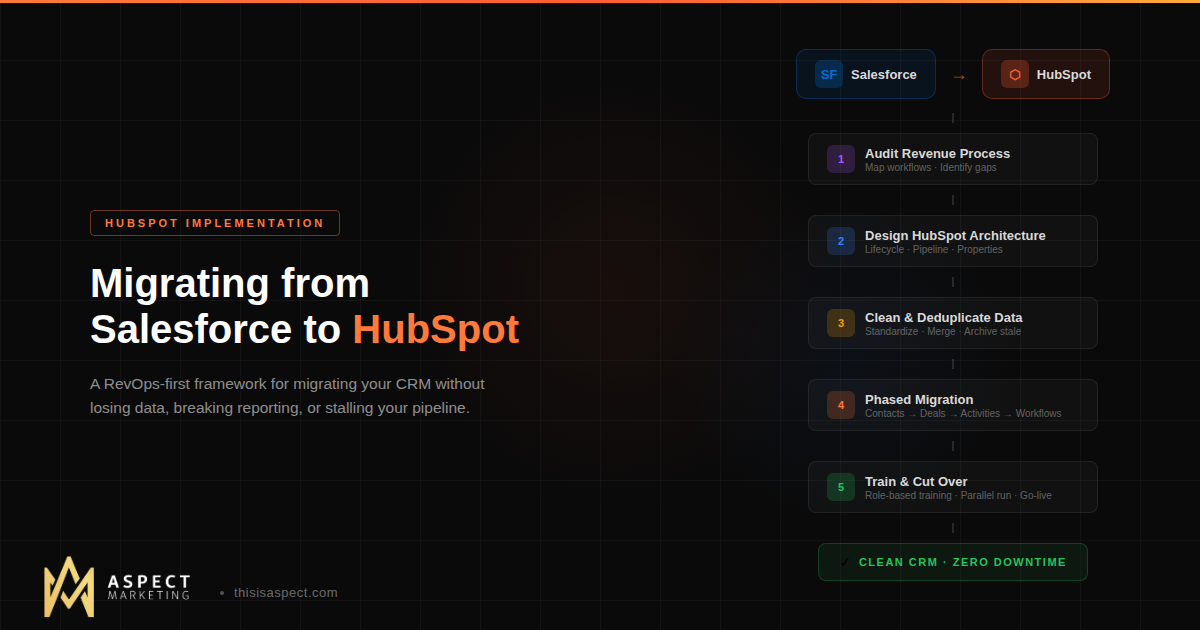
Phase 1: Audit Your Revenue Process, Not Just Your Data
Before you touch a single record, map your current end-to-end revenue process. Not what’s configured in Salesforce — what actually happens.
How do leads enter the system and get qualified? What are your real pipeline stages (not the ones nobody’s updated since 2019)? Where do handoffs happen between marketing, sales, and customer success? What reports does leadership actually use to make decisions? Which automations are mission-critical versus nice-to-have versus completely broken?
This audit serves two purposes. First, it tells you what needs to be recreated in HubSpot. Second — and more importantly — it surfaces the processes that weren’t working in Salesforce that you should fix during migration rather than replicate. A CRM migration is one of the rare opportunities to redesign your revenue operations model without the constraint of “but that’s how we’ve always done it.”
Phase 2: Design Your HubSpot Architecture Before You Migrate
This is where most teams skip ahead and pay for it later. Before any data moves, your HubSpot instance needs to be properly architected.
Lifecycle stages. Salesforce uses separate Lead and Contact objects. HubSpot uses a single Contact object with Lifecycle Stages to track progression. You need to define these stages before migration so that Salesforce Leads and Contacts map correctly — otherwise you’ll end up with a mess of contacts that nobody can segment properly.
Pipeline design. Don’t just copy your Salesforce pipeline stages into HubSpot. Redesign them based on how your team actually sells today. Define clear entry and exit criteria for each stage. Set deal probabilities that reflect reality. This is the foundation of your forecasting — get it right now.
Property strategy. Audit every custom field in Salesforce. You’ll be surprised how many are unused, redundant, or contradictory. Migrate only what’s needed, use HubSpot’s native properties wherever they exist, and establish naming conventions that will keep your database clean long-term. If you need a refresher on foundational HubSpot setup, our onboarding checklist covers the architecture decisions that matter most.
Custom objects. If you have complex data relationships in Salesforce (custom objects, junction objects), plan how these translate to HubSpot. You’ll need Enterprise tier for custom objects in HubSpot, so factor that into your licensing decision.
Phase 3: Clean Before You Move
This is non-negotiable. Migrating dirty data from Salesforce to HubSpot is like moving to a new house and bringing all the junk from your garage. You’ll spend more time cleaning up after the move than you saved by not cleaning before.
Deduplicate contacts and companies. Standardize fields like industry, country, and lead source. Remove stale records that haven’t been touched in 12+ months (archive them separately if needed). Merge incomplete duplicates. Verify that deal amounts, stages, and close dates are accurate for any open pipeline you’re migrating.
The goal is to start your HubSpot instance with data you actually trust — because clean data is the prerequisite to everything you’ll want to do later: reporting, automation, AI, attribution.
Phase 4: Migrate in Phases, Not All at Once
The biggest risk in any CRM migration is the “big bang” approach — turn off Salesforce on Friday, turn on HubSpot on Monday, and hope nothing breaks. Don’t do this.
Instead, migrate in phases while running both systems in parallel.
Phase A: Contacts and companies first. This is your foundational data. Migrate using HubSpot’s native Salesforce integration (which supports bidirectional sync) or via CSV export for more control. Validate that records mapped correctly, phone numbers are clean, lifecycle stages are assigned, and ownership is accurate.
Phase B: Deals and pipeline. Migrate open deals with their current stage, amount, and close date. Historical closed-won deals can come over for reporting purposes, but prioritize accuracy on active pipeline. Rebuild your pipeline stages if you redesigned them in Phase 2.
Phase C: Activities and engagement history. This is the trickiest part. Emails, calls, notes, meetings, and tasks from Salesforce can be migrated, but the level of effort varies. Decide what’s essential (most teams need 6-12 months of activity history) versus what’s nice to have (the email chain from 2018 that nobody will ever look at).
Phase D: Automations and workflows. Rebuild Salesforce Process Builder flows, Flow automations, and Apex triggers as HubSpot workflows. This is where having a RevOps lens matters — don’t recreate automations that were already broken. Rebuild the ones that support your redesigned revenue process.
Phase E: Integrations. Reconnect your tech stack to HubSpot. If you’re running tools like Aircall, Monday.com, Gorgias, or PartnerStack, most have native HubSpot integrations that are straightforward to set up. Map out every integration in Salesforce and determine whether it needs to reconnect to HubSpot or if HubSpot handles that function natively.
Phase 5: Train for Adoption, Not Just Features
The migration is only successful if your team actually uses HubSpot. And “here’s a training video” isn’t a training plan.
Build role-specific training for sales reps, managers, marketers, and customer success. Show them their actual workflows in HubSpot — not generic feature demos. Address the specific things they did in Salesforce and show them the HubSpot equivalent (or the better way to do it).
Run the new system in parallel for 2-4 weeks before cutting off Salesforce access. This gives your team a safety net and gives you time to catch mapping errors, missing data, or workflow gaps before they become real problems.
And designate an internal champion — someone on each team who’s bought into HubSpot and can help their peers through the transition. Peer adoption drives more behavior change than top-down mandates.
Phase 6: Validate, Optimize, and Cut Over
Before you decommission Salesforce, validate everything. Run your key reports in both systems and compare numbers. Test every workflow trigger. Verify that integrations are syncing correctly. Have your sales team confirm their pipeline looks right.
Set a firm cut-off date. Communicate it clearly. And when the day comes, turn off Salesforce sync, archive your Salesforce data (you’ll want it for reference), and commit fully to HubSpot.
Important note: when you disconnect the Salesforce sync, HubSpot does not delete data — but any Salesforce-only users or deactivated users will be flagged. You typically have 24-48 hours to reassign their records before ownership clears. Plan for this.
Common Migration Mistakes
Copying instead of redesigning. If you just replicate your Salesforce configuration in HubSpot, you’ve migrated your problems along with your data. Use the migration as an opportunity to fix what was broken.
Migrating everything. Not every field, record, and automation from Salesforce needs to come to HubSpot. Be ruthless about what you bring over. Less data migrated cleanly beats more data migrated messily.
Underestimating the timeline. A typical migration takes 8-12 weeks for mid-market companies. Rushing it leads to data errors, missed automations, and frustrated teams. Build buffer time between phases.
Skipping the parallel period. Running both systems for a few weeks feels redundant, but it’s your best insurance against data loss and workflow gaps. Don’t skip it.
Ignoring change management. The technical migration might go perfectly, but if your sales team isn’t bought in, they’ll resist the new system. Invest in communication, training, and quick wins that show your team HubSpot makes their job easier, not harder.
When to Bring In Help
Some companies can manage a Salesforce to HubSpot migration internally, especially if they have RevOps resources and a relatively simple Salesforce setup. But if you have custom objects, complex automations, multiple integrations, or more than a few thousand records — working with a HubSpot Solutions Partner significantly reduces risk and timeline.
At Aspect, CRM migrations are core to what we do. We handle the audit, architecture design, data mapping, phased migration, integration reconnection, and team training — so your team can keep selling while the systems transition underneath them. If you’re evaluating a move from Salesforce (or any other CRM) to HubSpot, let’s talk through your situation.
Kevin Kyser is the founder of Aspect Marketing, a HubSpot Partner agency specializing in RevOps, GTM strategy, and AI-powered automation for B2B teams.