
Your go-to-market tech stack should make your team faster — not create more work. Here’s how to build one that actually connects, and how to know when you’ve added enough.
Most B2B companies don’t have a tech stack problem. They have a tech pile problem.
You’ve got a CRM, a marketing automation platform, a project management tool, a phone system, a support desk, an enrichment provider, maybe a BI tool — and half of them don’t talk to each other. Data lives in silos. Reports contradict each other. And your RevOps team (if you have one) spends more time maintaining the stack than actually using it to grow revenue.
Sound familiar?
Building a connected GTM tech stack isn’t about buying the trendiest tools. It’s about choosing the right ones, integrating them properly, and knowing when to stop adding. The companies that get this right don’t necessarily have bigger budgets — they have cleaner architectures.
Here’s how to think about it.
What Is a GTM Tech Stack, Exactly?
A go-to-market (GTM) tech stack is the collection of software tools that power your sales, marketing, and customer success motions. It covers everything from how you attract leads to how you close deals to how you retain and expand accounts.
The key word is connected. A GTM tech stack isn’t just a list of tools your team uses — it’s a system where data flows between those tools in a way that gives every revenue team a shared, accurate view of the customer.
When it works, you get clean attribution, faster handoffs, better forecasting, and less time wasted on manual data entry. When it doesn’t, you get conflicting dashboards, missed follow-ups, and the kind of “wait, which number is right?” conversations that derail every pipeline review.
Start With the Foundation: Your CRM
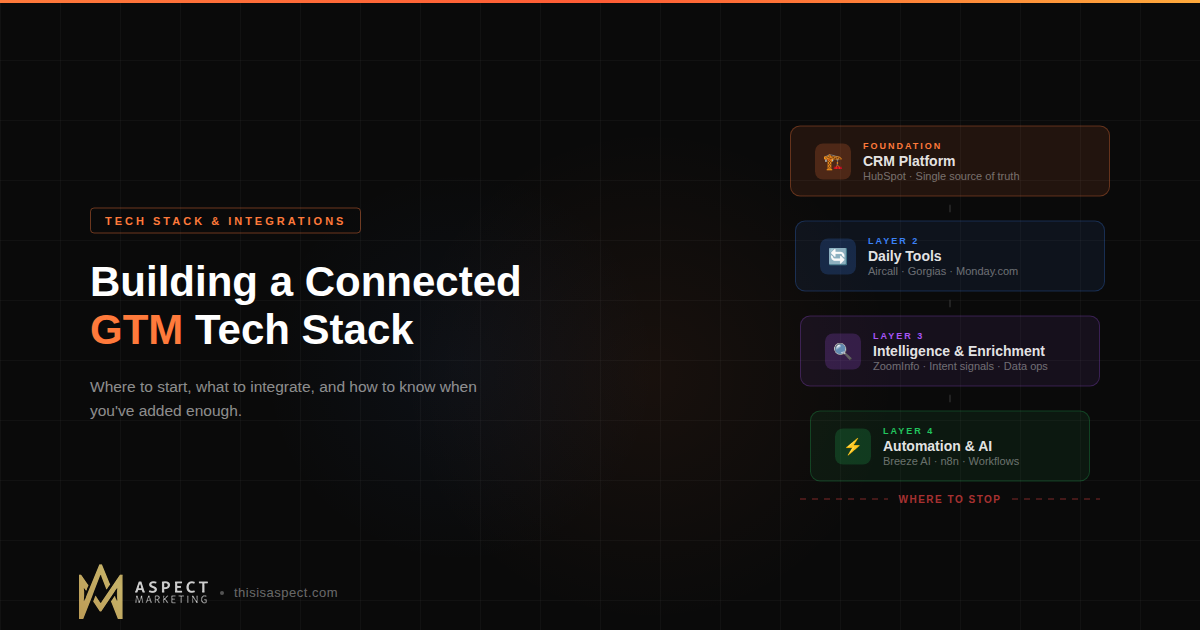
Every connected GTM stack starts with the CRM. Not because it’s the most exciting tool — but because it’s the single source of truth that everything else plugs into.
For most B2B teams we work with, that’s HubSpot. And the reason isn’t just feature set — it’s that HubSpot is designed to be a platform, not just a database. Marketing Hub, Sales Hub, Service Hub, and Operations Hub all share the same underlying data model, which eliminates a huge category of integration headaches before they start.
But here’s the part most teams skip: your CRM is only as good as its setup. If your lifecycle stages are vague, your properties are inconsistent, and your pipelines don’t match how your team actually sells, no amount of integration work will fix the downstream mess. If you’re still in the early stages of getting HubSpot right, start with our onboarding checklist — it covers the foundational architecture that makes everything else possible.
The CRM isn’t just tool #1 in your stack. It’s the operating system for your entire GTM motion.
Layer 2: The Tools That Touch Your CRM Daily
Once your CRM foundation is solid, the next layer is the tools your team uses every day that need bidirectional data flow with HubSpot (or whatever CRM you’re running). These are the tools where, if the integration breaks, someone notices within hours.
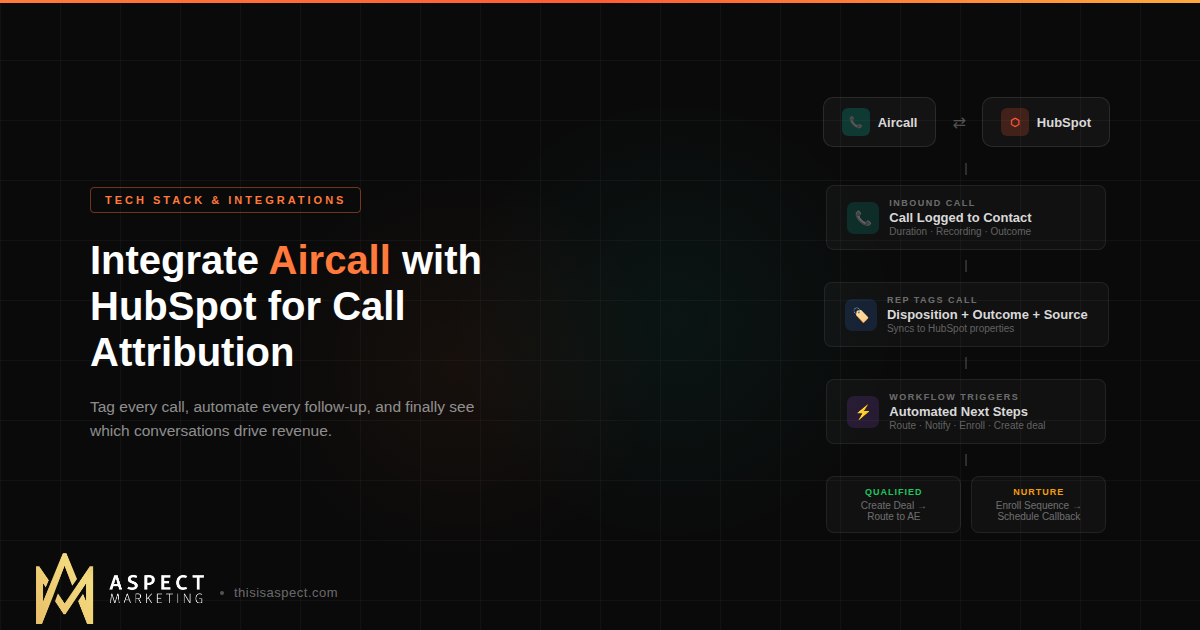
Sales engagement and calling. Your reps are making calls, sending sequences, and logging activities. Tools like Aircall give you call recording, disposition tracking, and full-funnel call attribution — but only if the integration is set up to sync call outcomes, recordings, and contact associations back into your CRM automatically. Without that sync, your call data lives in a silo and your attribution model has a blind spot.
Support and ticketing. If you’re running a support operation — especially in ecommerce or SaaS — your ticketing system needs to feed customer health data back into the CRM. Tools like Gorgias (for ecommerce) or HubSpot Service Hub (for B2B) close the loop between support interactions and the customer record. When your CS team can see a customer’s full history and your sales team can see open tickets before a renewal call, everyone wins.
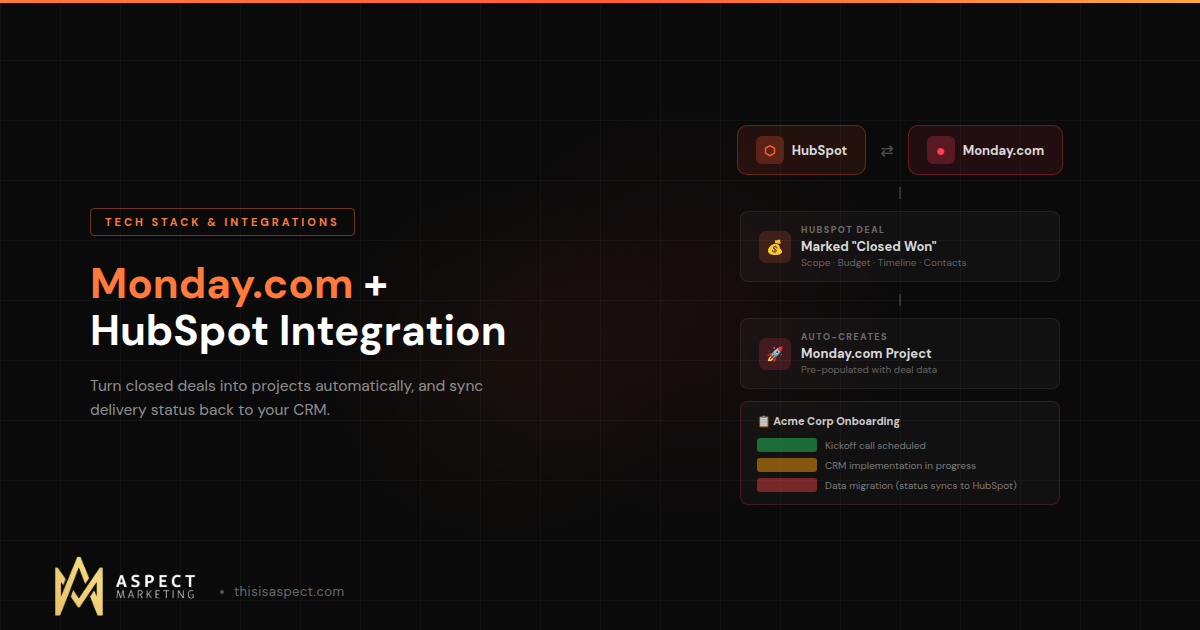
Project management. This one surprises people, but your project management tool is part of your GTM stack. If you’re using Monday.com or similar platforms to manage client delivery, implementation timelines, or campaign execution, connecting that to your CRM means you can track delivery status alongside deal status. No more “let me check with the project team” during a client call.
The pattern here is simple: if a tool generates data that a revenue team needs to make a decision, it needs to be connected to your CRM. If it doesn’t, it’s a standalone utility — useful, but not part of your GTM system.
Layer 3: Intelligence and Enrichment
This is where many teams over-invest too early. Data enrichment tools, intent signal platforms, conversation intelligence, AI-powered lead scoring — the category is exploding, and the FOMO is real.
Here’s the practical framework: intelligence tools are only valuable if you have clean data to enrich and clear processes to act on the enriched data. Buying ZoomInfo when your CRM has 40% duplicate contacts and no standardized industry field is like putting premium fuel in a car with a cracked engine block.
If your CRM data is clean, enrichment becomes powerful. You can append firmographic data to auto-segment accounts, use intent signals to prioritize outreach, and layer conversation intelligence on top of your call recordings for coaching insights.
But if your data isn’t clean yet, invest there first. Clean data is the prerequisite to everything — enrichment, AI, reporting, attribution. Skip the foundation, and every layer you build on top will be unreliable.
Layer 4: Automation and AI
Once you have a connected CRM, integrated daily tools, and clean data flowing between them, you’ve earned the right to add automation and AI.
This is where tools like HubSpot’s workflow engine, n8n (for custom automations), and Breeze AI actions inside HubSpot workflows start delivering real value. You can automate lead routing based on enriched data. You can trigger AI-powered lead classification the moment a new contact enters the system. You can auto-summarize calls and push key insights to deal records.
The key principle: automate processes that are already working manually. If your lead handoff process is chaotic when humans do it, automating it just makes it chaotic faster. Get the process right first, then use automation to scale it.
And when it comes to AI specifically, start with one workflow, prove it works, and expand from there. The teams that try to “AI everything” on day one are the ones who end up with hallucinated data in their CRM and a very confused sales team.
Where to Stop: The Signs You’ve Over-Built
This is the part nobody writes about, but it’s arguably the most important.
Here are the signs your GTM tech stack has crossed the line from “connected” to “complicated”:
You’re paying for tools nobody uses. Run a quarterly audit. If a tool has fewer than 3 active users or hasn’t been logged into in 30 days, it’s dead weight. Kill it.
Your integrations require a full-time admin. Some integration complexity is inevitable. But if you need a dedicated person just to keep your sync jobs running, your architecture has a design problem — not a staffing problem.
Reports from different tools tell different stories. If your marketing platform says you generated 200 MQLs last month and your CRM says 140, you don’t have a reporting problem. You have an integration problem. And it’s eroding trust in every number your team sees.
New tools create more questions than they answer. When every new platform requires a 3-week implementation and retraining for the team, you’ve hit diminishing returns. The next tool you add should simplify something, not add a new layer of complexity.
You’re integrating tools to justify keeping them. This is the most subtle trap. If you find yourself building elaborate workarounds to make a tool fit your process, ask whether the tool is actually serving you — or whether you’re serving the tool.
The best GTM stacks we’ve seen aren’t the biggest. They’re the ones where every tool has a clear job, clean data flows in and out of the CRM, and the whole system is understandable by someone who didn’t build it. That last point matters more than people think — if your stack requires tribal knowledge to operate, it’s a liability, not an asset.
A Practical Starting Stack for B2B Teams
If you’re building from scratch or rethinking what you have, here’s a pragmatic starting point:
CRM + Marketing + Sales + Service: HubSpot (one platform, shared data model, no integration tax between hubs)
Calling + Phone System: Aircall (native HubSpot integration, call attribution, team routing)
Project Management: Monday.com (client delivery tracking, cross-team visibility)
Support (Ecommerce): Gorgias (Shopify + HubSpot sync, ticket-to-contact mapping)
Partner Management: PartnerStack (if you run a partner or referral program — tracks partner-sourced revenue back to HubSpot)
Automation (Custom): n8n or HubSpot Operations Hub (for workflows that go beyond native capabilities)
That’s six tools (or fewer, depending on your model) that cover the full customer lifecycle with clean data flow. You can always add enrichment, intent data, and advanced AI later — but only after this foundation is solid.
Notice what’s not on the list: a separate email platform, a standalone analytics tool, a dedicated landing page builder, or a second CRM “just for marketing.” Every one of those creates a data silo. If HubSpot can do it natively, let it. Save your integration budget for the tools that genuinely do something HubSpot can’t.
The RevOps Lens: Why Architecture Matters More Than Tools
The companies that build the best GTM stacks aren’t the ones with the biggest budgets. They’re the ones with a RevOps operating model — a single team (or person) responsible for the systems, data, and processes that span sales, marketing, and customer success.
Without that cross-functional lens, every team optimizes their own tools in isolation. Marketing picks their own analytics platform. Sales buys their own engagement tool. CS sets up their own ticketing system. And nobody owns the integration layer between them.
RevOps doesn’t just align teams — it aligns systems. And that alignment is what turns a tech pile into a tech stack.
What Comes Next
If you’re looking at your current tools and feeling the friction, you’re not alone. Most companies we work with aren’t starting from zero — they’re untangling something that grew organically over years of “just add another tool” decisions.
The fix isn’t always ripping everything out. Sometimes it’s as simple as properly configuring the integrations you already have, cleaning the data that flows through them, and retiring the tools that aren’t earning their seat.
That’s the kind of work we do every day at Aspect. Whether you’re building your first connected stack or consolidating a sprawling one, we can help you design the architecture — and make sure it actually works the way your team needs it to.
Kevin Kyser is the founder of Aspect Marketing, a HubSpot Partner agency specializing in RevOps, GTM strategy, and AI-powered automation for B2B teams.