
 HubSpot
 FirstTouch
 Instantly
 Aircall
 Gorgias
 Introw
 Google Ads
 Netlify
 ElevenLabs
 PandaDoc
Should you vibe code your CRM? Not once you're past 5 people
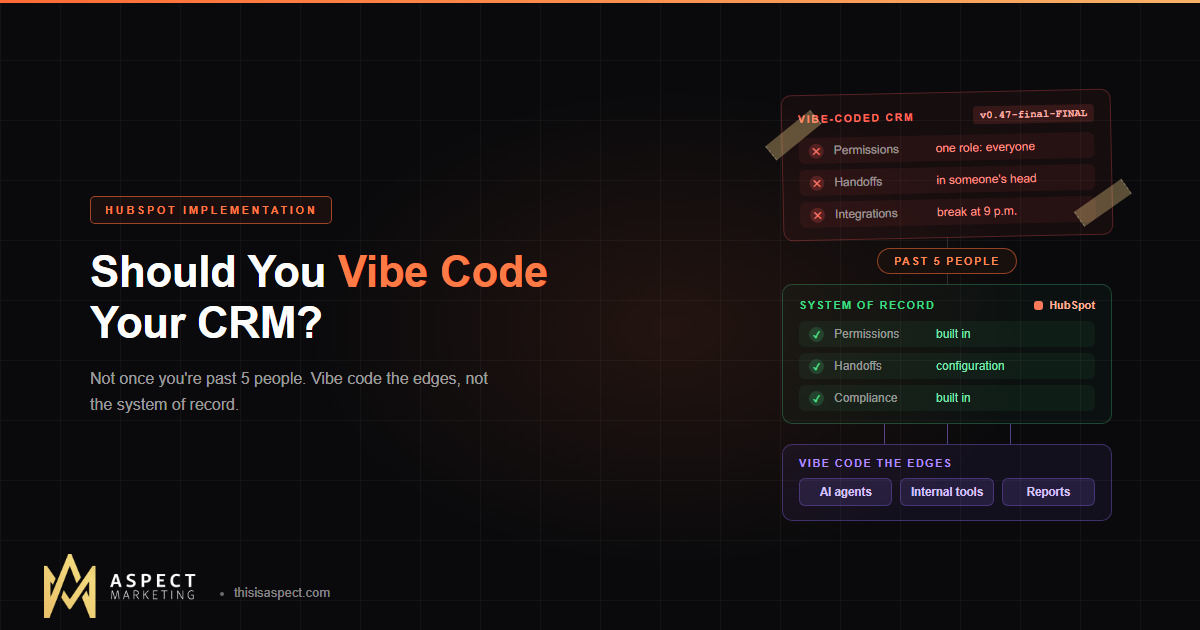
You can vibe code a CRM in a weekend. Past 5 people, you're signing up to run a software company on the side. Here's where the line is and what to build instead.
Somebody on your team just built a working CRM in a weekend with an AI coding tool. It has contacts, deals, a pipeline view, and it cost nothing. So why pay for HubSpot?
Here's the short answer: if you're a team of 5 or fewer, go ahead and vibe code a CRM. Past 5 people, don't. At that size a CRM stops being a list of contacts and becomes the rulebook your whole revenue team runs on, and a vibe-coded CRM turns you into a part-time software company with one unpaid engineer.
I build with AI every day, so this isn't an agency defending its turf. My take is simple: vibe code the edges, not the system of record. Below is why 5 people is the line, the three things that break first, and what you should build with AI instead.
Why is 5 people the line for a vibe-coded CRM?
Five people is roughly where one shared list turns into three teams with different jobs. Once you have someone selling, someone marketing, and someone keeping customers happy, the CRM has to do more than store records. It has to decide who sees what, move records between teams, and connect to every other tool they use.
A founder and two reps can run on trust and a shared spreadsheet. A 50-person company can't. The gap between those two is where homegrown CRMs quietly fall apart, usually around month three, when the person who built it is busy doing their actual job.
Vibe coding: building software by describing what you want to an AI tool and accepting the code it writes, often without reading it closely.
That definition is the whole problem in one sentence. A CRM is the one system where "without reading it closely" gets expensive.
Permissions and roles: who is allowed to see and change what?
A vibe-coded CRM usually ships with one user type: everyone. That's fine at 3 people. Once you're past 5, it becomes a liability.
Here's what a real team needs on day one, and what you'd have to build, test, and maintain yourself:
- Role-based access: Sales sees deals. Marketing sees campaigns and lead sources. Finance sees contract values. Nobody but an admin can delete in bulk.
- Record ownership: Reps see their own deals, managers see their team's, and leadership sees everything.
- Audit history: When a deal amount changes from $80K to $8K, you need to know who did it and when.
- Offboarding: When a rep leaves, their access dies that day and their records get reassigned, not exported to a personal laptop.
HubSpot handles all four natively through user permissions and teams (some of the finer controls, like field-level restrictions, depend on your HubSpot tier). Your AI-built CRM handles them if someone remembers to ask for them, and if the AI builds them correctly, and if nobody breaks them in the next round of changes.
That last part isn't paranoia. Researchers at Georgia Tech's School of Cybersecurity and Privacy track security flaws traced to AI-written code, and authentication bypass is one of the recurring patterns. Their Vibe Security Radar found 35 confirmed cases in March 2026 alone, more than all of 2025 combined. Your customer list and deal values are exactly the data you don't want behind a login screen nobody reviewed.
Handoffs: the part a vibe-coded CRM never enforces
The expensive part of a CRM is the process built into it: how a lead becomes an opportunity, who gets it, and what happens next. An AI tool will happily build you a contacts table. It won't design your lifecycle stages or stop a rep from skipping one.
In the HubSpot portals we audit, the most common problem isn't missing data. It's handoffs nobody enforces. Marketing calls something an MQL, sales never follows up, and nobody can say why the lead died. That happens in HubSpot too when it's set up badly. In a homegrown CRM, it's the default, because the rules only exist in someone's head.
A working revenue engine needs:
- Lifecycle stages with definitions that sales and marketing actually agree on
- Lead routing that assigns an owner in minutes, not whenever someone checks the app
- Required fields at key stages, so a deal can't hit "Closed Won" without an amount and a close date
- Automated handoffs from sales to customer success when the deal closes
Every one of those is a workflow, a validation rule, and a notification you'd have to build and keep working. In HubSpot, they're configuration. That's the difference between setting a rule and maintaining the code that enforces it.
Integrations and compliance: the stuff you'd rebuild forever
Your CRM doesn't live alone, and every connection you add is one more thing you have to maintain yourself. A 5-plus person team usually needs the CRM to talk to:
- Email and calendar (Gmail or Outlook sync, meeting booking)
- Calling and conversation tools
- Website forms and chat
- Ad platforms, for knowing which campaign produced which deal
- Billing or accounting, for knowing what actually got paid
(If you're deciding which of those to connect first, here's where to start and where to stop.) Each of those APIs changes on its own schedule. When one breaks at 9 p.m. on the last day of the quarter, your vibe-coded CRM's support team is whoever built it.
Then there's compliance. If you market to people in Europe or California, you need consent tracking, unsubscribe handling, and a way to fully delete someone's data when they ask. HubSpot builds this in. With a custom CRM, you're responsible for getting it right, and for proving it if anyone asks.
| Vibe-coded CRM | HubSpot | |
|---|---|---|
| Time to first version | A weekend | Weeks, with a proper implementation |
| Permissions and audit trail | Whatever you remember to build | Built in |
| Lifecycle stages and routing | Custom code | Configuration |
| Email, calendar, ads integrations | Build and maintain each one | Native or marketplace apps |
| Consent and data deletion | Your problem | Built-in tools |
| Who fixes it when it breaks | The person who built it, if they're still around | HubSpot support, plus your admin or partner |
| Best for | Solo founders, teams of 5 or fewer | Teams past 5 with separate sales, marketing, and CS |
What to vibe code instead: build on HubSpot, not in place of it
The best use of AI coding tools for a growing team is building on top of your CRM, not rebuilding it. Let HubSpot be the single source of truth, and use AI to build the things HubSpot doesn't do out of the box.
Things worth vibe coding on top of HubSpot:
- Internal tools: a quoting calculator, a territory lookup, a deal-desk intake form that writes back to HubSpot through the API.
- AI agents: research agents that enrich new companies, draft follow-ups, or summarize calls into CRM notes. (More on what agentic AI in RevOps actually looks like.)
- Reporting helpers: scripts that pull HubSpot data into the exact weekly view your leadership team keeps asking for.
- Workflow glue: small integrations between HubSpot and a niche tool that doesn't have a marketplace app.
If one of these breaks, you lose a convenience for an afternoon. If your CRM breaks, you lose your pipeline. That's the whole argument.
This is how we work at Aspect. We're an AI-first shop, and we build custom AI agents and integrations for clients all the time. We just build them on a CRM that already handles permissions, handoffs, and compliance.
FAQ
Can a small team use a vibe-coded CRM?
Yes. A solo founder or a team of up to about 5 people with one sales motion can run on a simple AI-built CRM. Plan to move to a real platform once you add separate marketing, sales, and customer success roles.
Is HubSpot overkill for a 10-person company?
Usually not. At 10 people you already need permissions, lead routing, and email integration, which HubSpot includes. The risk at that size is overbuilding the setup, not the platform itself, so start with the core objects and a few workflows. Our HubSpot onboarding checklist covers what to set up first.
Can I use AI to customize HubSpot?
Yes, and you should. AI coding tools are great for building internal apps, agents, and integrations that read and write HubSpot data through its API. Keep HubSpot as the system of record and build the custom pieces around it.
How long does a HubSpot implementation take?
It depends on scope: how many Hubs you're rolling out, how much data you're migrating, and how many teams go live at once. A single-team setup moves much faster than a multi-team rollout with a migration. Aspect's implementation projects range from $4.5K to $13.5K; see pricing for details.