
Phone calls still close deals. But if your call data doesn’t flow back into your CRM, you’re flying blind on what’s actually driving revenue. Here’s how to set up the Aircall + HubSpot integration the right way.
Here’s a scenario we see constantly: a B2B sales team makes hundreds of calls a week. Deals close. Revenue comes in. But when leadership asks “which campaigns are actually driving pipeline?” or “what’s our speed-to-lead on inbound calls?”, nobody has a clean answer — because the call data lives in one system and the CRM data lives in another.
This is the gap that a properly configured Aircall + HubSpot integration closes. Not just connecting the two tools, but building a system where every call — inbound, outbound, missed, voicemail — flows into HubSpot with enough context to power attribution reporting, automated follow-up, and real coaching insights.
Aircall is HubSpot’s Premier technology partner and their 2025 Co-selling Partner of the Year for the third consecutive year. The integration is native, deep, and actively maintained. But “install and forget” is where most teams go wrong. The difference between a basic connection and a properly architected call attribution system is the difference between “we have call logs” and “we know exactly which calls influenced which revenue.”
Let’s walk through how to do it right.
Step 1: Get the Foundation Right Before You Connect
Understanding the Aircall HubSpot Integration
Before you install anything, make sure your HubSpot CRM is ready to receive call data properly. This means your contact records need clean phone number formatting (Aircall matches calls to contacts using phone numbers, so inconsistent formatting creates orphaned call records), your lifecycle stages and deal pipelines need to be defined (because you’ll want to trigger different workflows based on where a contact is in the funnel), and your team members need matching email addresses in both platforms (this is how Aircall maps call ownership — if emails don’t match, calls log to the wrong rep or nobody at all).
If your HubSpot setup is still a work in progress, start with the onboarding fundamentals before layering in a phone integration. A clean CRM is the prerequisite. Connecting Aircall to a messy database just means you’re logging calls into chaos.
Step 2: Install and Configure the Integration
The installation itself takes about five minutes. Log into your Aircall admin dashboard, navigate to Integrations & API, find HubSpot, and click Install. You’ll authorize the connection, select which Aircall numbers to link, and run a test call to confirm data is flowing.
But configuration is where the real work happens. Here’s what to set up:
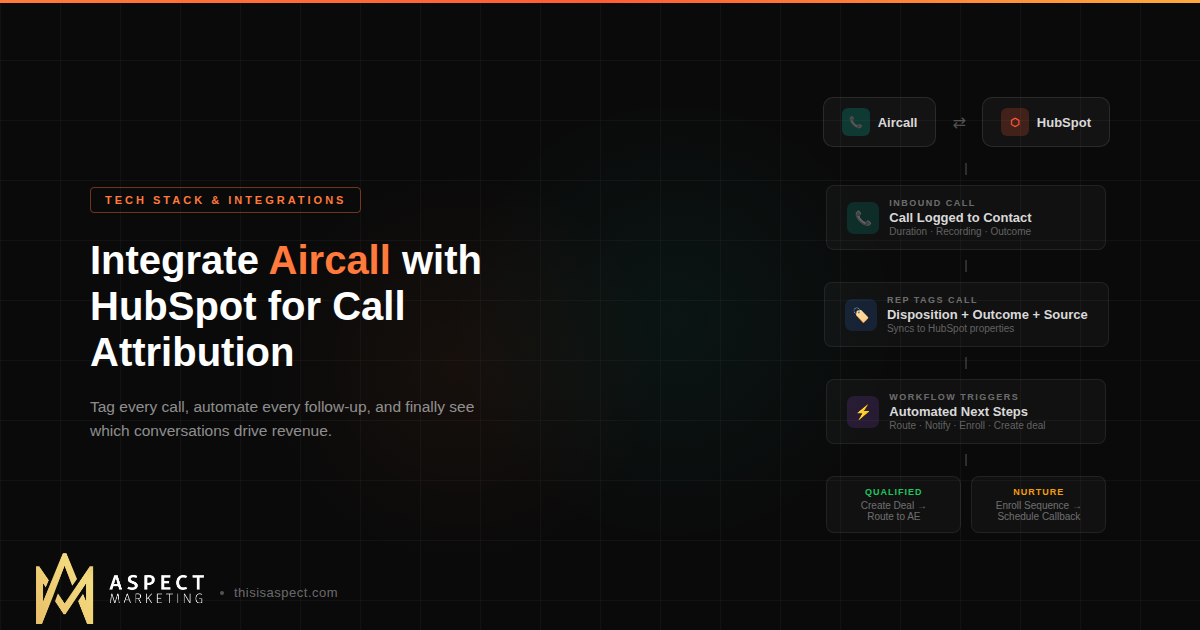
Call outcome mapping. Aircall lets you map its internal tags to HubSpot’s call outcome fields. This is critical for reporting. Create tags in Aircall that match your actual sales process — things like “Qualified,” “Nurture,” “No Answer,” “Left Voicemail,” “Not Interested” — and map each one to a corresponding HubSpot call outcome. When a rep tags a call in Aircall, it automatically sets the right outcome in HubSpot without anyone having to double-enter data.
Contact creation rules. Decide whether Aircall should create new contacts in HubSpot for unknown numbers. For sales teams, this is usually a yes — you want every inbound call captured. For support teams, it depends on your workflow. Either way, make this a deliberate decision rather than leaving the default.
Call ownership assignment. Configure who gets assigned as the owner of a call activity. This should map to the rep who actually made or received the call, which requires matching email addresses between platforms. Set a default owner for edge cases where no match is found.
Ticket creation (if applicable). If you’re running Service Hub, Aircall can automatically create support tickets from inbound calls. You can configure which pipeline receives tickets and what status they start in. If you’ve also connected Aircall to HubSpot Help Desk, know that HubSpot’s ticket creation logic takes over for those numbers — Aircall’s own ticket rules won’t apply.
Number-level settings. You can connect specific Aircall numbers to HubSpot and leave others disconnected. This is useful if you have numbers for internal calls or personal lines that shouldn’t clutter your CRM data.
Step 3: Build the Tag Structure That Powers Your Reporting
This is the step most teams skip — and it’s the one that makes or breaks your call attribution.
Aircall tags sync directly to HubSpot contact records as custom properties. This means you can use them in HubSpot lists, workflows, reports, and dashboards. But only if your tag structure is intentional.
Here’s a practical tag framework:
Call disposition tags describe what happened on the call: Connected, No Answer, Left Voicemail, Wrong Number, Gatekeeper. These tell you reach rates and help optimize calling windows.
Call outcome tags describe the result: Qualified, Not Qualified, Nurture, Meeting Booked, Closed Won Follow-Up. These power your pipeline workflows and tell you which calls actually move deals forward.
Call source tags describe why the call happened: Inbound Lead, Outbound Prospecting, Referral Follow-Up, Renewal Check-In, Support Escalation. These are the key to attribution — they connect call activity back to the marketing channel or campaign that initiated the conversation.
When your reps apply these tags consistently (which takes training and accountability, not just setup), you unlock the ability to build HubSpot reports that answer questions like: “How many qualified calls came from inbound leads this month?” and “What’s our connect rate on outbound prospecting calls?” and “Which campaign source produces calls that convert to meetings at the highest rate?”
That’s full-funnel call attribution. Not just “we made 200 calls” — but “these calls came from these sources and produced this much pipeline.”
Step 4: Automate the Post-Call Workflow
Once call data flows into HubSpot with proper tags and outcomes, you can automate what happens next. This is where the integration stops being a logging tool and becomes a revenue engine.
Lead routing based on call outcome. Build a HubSpot workflow that triggers when a call is tagged “Qualified.” The workflow creates a deal, assigns it to the rep, and sends a Slack notification to the sales manager. For calls tagged “Nurture,” enroll the contact in a nurture sequence automatically. For “No Answer,” schedule a callback task for the next business day.
Speed-to-lead alerts. Create a workflow that fires when a new inbound call creates a contact in HubSpot. If the call was missed or went to voicemail, trigger an immediate task and Slack alert so someone calls back within minutes, not hours.
Meeting follow-up. When a call is tagged “Meeting Booked,” trigger a workflow that sends a calendar link, updates the deal stage, and notifies the account executive — all without the rep lifting a finger after tagging the call.
Conversation intelligence triggers. Aircall now integrates with HubSpot’s Conversation Intelligence, which means call transcriptions flow into HubSpot automatically. You can search for keywords across calls, identify coaching opportunities, and even trigger workflows based on specific phrases mentioned during calls.
The principle here is the same one we apply to AI-powered HubSpot workflows: automate the process that already works manually, then let the system handle the repetitive parts so reps can focus on selling.
Step 5: Build the Attribution Reports
With clean data flowing and tags applied consistently, you can now build the reports that actually matter.
Call activity dashboard. Total calls by rep, connect rates, average call duration, calls by disposition. This is your sales activity baseline.
Call-to-pipeline report. How many calls resulted in qualified opportunities? What’s the conversion rate from connected call to deal created? Break this down by call source tag to see which channels produce the best conversations.
Source attribution report. Using the call source tags, build a report that shows pipeline and revenue influenced by call activity, segmented by original lead source. This is the report that answers the big question: are phone calls driving revenue, and if so, which types of calls from which sources?
Rep performance report. Combine call volume, connect rate, qualification rate, and pipeline generated per rep. This gives managers coaching data, not just activity data — you can see who’s making a lot of calls versus who’s making calls that convert.
Common Mistakes to Avoid
Not training reps on tagging. The integration is only as good as the data reps put into it. If tags aren’t applied consistently, your reports are meaningless. Build tagging into your call process, review it in pipeline meetings, and make it part of rep accountability.
Leaving default settings. The out-of-the-box configuration works, but it’s generic. If you don’t customize call outcome mapping, contact creation rules, and ownership assignment, you’ll spend more time cleaning up data than using it.
Connecting too many numbers. Only connect the numbers that should log to HubSpot. Internal lines, personal cells, and test numbers create noise in your data.
Ignoring missed calls. Missed inbound calls are often your highest-intent leads — someone picked up the phone to call you. If those aren’t triggering immediate follow-up workflows, you’re leaving money on the table.
Why This Matters for Your GTM Stack
Phone calls aren’t going away in B2B. If anything, they’re becoming more important as email response rates decline and buyers expect faster, more personal engagement. But call data has historically been the biggest blind spot in revenue attribution.
A properly configured Aircall + HubSpot integration eliminates that blind spot. Every call becomes a data point. Every conversation connects back to a source. Every outcome triggers the right next step.
That’s what a connected GTM tech stack looks like in practice — not just tools that are installed, but tools that are integrated in a way that makes your entire revenue operation smarter.
If you’re running Aircall and HubSpot but haven’t gotten the integration right — or if you’re evaluating Aircall as part of a new stack buildout — we can help. As an Aircall partner and HubSpot Gold Partner, this is exactly the kind of integration architecture we build for B2B teams every day.
Kevin Kyser is the founder of Aspect Marketing, a HubSpot Partner agency specializing in RevOps, GTM strategy, and AI-powered automation for B2B teams.