
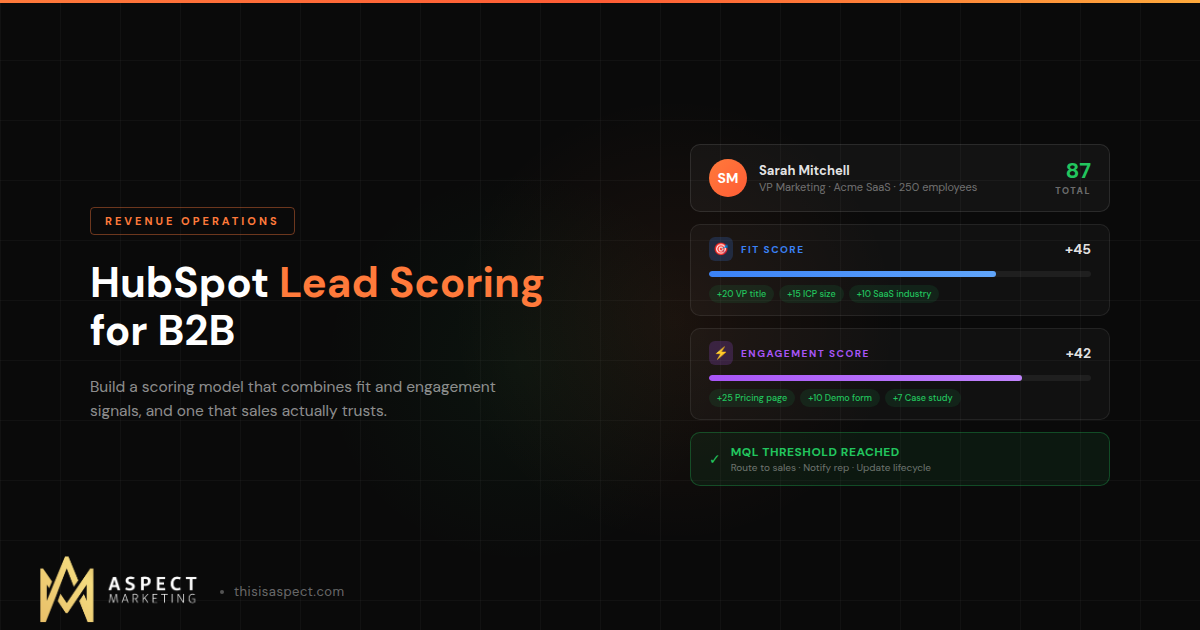

HubSpot Lead Scoring for B2B: How to Build a Model That Sales Actually Trusts
Lead scoring only works if sales trusts the scores. Here’s how to build a HubSpot lead scoring model that reflects your real ICP, uses both fit and engagement signals, and actually changes how your team prioritizes pipeline.
Every B2B company reaches the same inflection point: leads are coming in, but sales doesn’t know which ones to call first. Marketing says “we sent you 200 leads.” Sales says “most of them were garbage.” And nobody has an objective framework for deciding who’s worth pursuing and who’s not.
That’s what lead scoring is supposed to solve. And in theory, it does. Assign points based on who the lead is and what they’ve done, set a threshold, and route the highest-scoring leads to sales. Simple.
In practice, most lead scoring models fail. Not because the math is wrong, but because sales doesn’t trust them. The scores don’t match what reps see in real conversations. High-scoring leads turn out to be tire-kickers. Low-scoring leads close unexpectedly. Eventually, reps stop looking at scores entirely and go back to gut feel.
Here’s how to build a HubSpot lead scoring model that actually earns sales’ trust.
The Two Dimensions: Fit Score and Engagement Score
Understanding HubSpot Lead Scoring for B2B
Effective lead scoring in HubSpot operates on two separate dimensions, and you need both.
Fit score measures how closely a lead matches your ideal customer profile. This is based on who they are: their job title, company size, industry, revenue, technology stack, and geography. A VP of Marketing at a 200-person SaaS company is a better fit than an intern at a 5-person agency, regardless of how many emails either one opens.
Engagement score measures how actively a lead is interacting with your content and brand. This is based on what they’ve done: pages visited, forms submitted, emails clicked, content downloaded, webinars attended, and how recently any of that happened.
A lead can be a perfect fit but completely disengaged. Or highly engaged but a terrible fit. You need both signals to make good routing decisions. HubSpot supports multiple score properties, so you can track fit and engagement as separate scores and use them together in your qualification logic.
Step 1: Define Your ICP With Sales, Not for Sales
This is where most scoring projects go wrong before they start. RevOps or marketing builds the scoring model based on their assumptions about the ideal customer, ships it to sales, and wonders why nobody uses it.
The fix is simple: build it together. Sit down with your top-performing reps and ask specific questions. Which closed-won deals from the last year were the best fit? What made them good? Which deals were painful or ultimately churned? What did those have in common? What job titles do you actually want to talk to? What company size range is your sweet spot?
Their answers become your fit scoring criteria. Not theoretical ICP definitions from a strategy deck, but actual patterns from deals that worked. When sales sees their own input reflected in the scores, trust follows naturally.
Step 2: Build the Fit Score
Your fit score should be based on firmographic and demographic properties that are reliably populated in your CRM. There’s no point scoring on fields that are empty for 60% of your contacts.
Here’s a practical framework:
High positive signals (+10 to +20 points each). Job titles that match your buyer personas (VP/Director of Marketing, RevOps, Sales Ops). Company size in your sweet spot (50-500 employees for mid-market). Industry verticals where you’ve proven success. Revenue range that matches your deal size targets.
Moderate positive signals (+5 to +10 points each). Adjacent job titles (Manager-level in the right department). Company size slightly outside your sweet spot but still viable. Using technology in your ecosystem (HubSpot customers, for example, if that’s relevant to your offering).
Negative signals (-5 to -20 points each). This is the part most teams skip, and it’s arguably the most important. Students and interns (-15). Companies under 10 employees (-10). Competitors (-20). Personal email domains like gmail.com or yahoo.com (-10). Industries you don’t serve (-10). Geographic regions outside your market (-5).
Negative scoring is what prevents your model from qualifying leads that look engaged but will never buy. Without it, that marketing student who downloaded every piece of content you’ve ever published will score higher than a VP who visited your pricing page once. Negative scores keep the model honest.
Step 3: Build the Engagement Score
Engagement scoring should weight actions by intent signal strength, not just volume. Someone who visits your pricing page once is showing more buying intent than someone who reads ten blog posts.
High-intent actions (+15 to +25 points). Pricing page visit. Demo or consultation request form submission. Case study or ROI calculator engagement. Contact page visit. Bottom-of-funnel content download.
Medium-intent actions (+5 to +10 points). Blog post visits (cap this so reading twenty posts doesn’t max out someone’s score). Email link clicks. Webinar registration. Middle-of-funnel content download. Return visits within a 7-day window.
Low-intent actions (+1 to +3 points). Email opens (these are increasingly unreliable as a signal). Social media clicks. Generic page visits. Newsletter subscription.
Decay and negative engagement signals. This is critical for B2B where sales cycles are long. A pricing page visit from six months ago isn’t worth the same as one from last week. HubSpot supports score decay, so use it. Set engagement scores to decrease over time so your model reflects current interest, not historical curiosity.
Also apply negative engagement scores: email unsubscribe (-10), hard bounce (-15), marked as spam (-20). These signals should actively pull someone’s score down.
Step 4: Set Thresholds That Trigger Action
Scores are meaningless without thresholds that trigger specific actions. Define what happens at each level:
Marketing Qualified Lead (MQL) threshold. When a contact’s combined fit + engagement score crosses this line, they transition from marketing nurture to sales review. This threshold should be calibrated so that roughly 70-80% of contacts who cross it are genuinely worth a sales conversation. If it’s lower than that, your threshold is too low.
Sales Qualified Lead (SQL) threshold. After sales reviews the MQL and confirms interest and timing, the contact becomes an SQL. This is a human step. Lead scoring gets the lead to sales’ attention, but qualification still requires a conversation.
Recycle threshold. If a lead was sent to sales but scored below MQL threshold after engagement decayed, automatically recycle them back to marketing nurture. This prevents dead leads from clogging sales queues.
Build HubSpot workflows around these thresholds. When a contact crosses MQL: update lifecycle stage, create a task for the assigned rep, send a Slack notification with the contact’s score breakdown and key details, and enroll in a sales sequence. Automate the handoff so nothing falls through the cracks.
Step 5: Connect Scoring to Your Full Revenue Process
Lead scoring shouldn’t live in isolation. It should connect to your entire RevOps operating model, influencing routing, reporting, and forecasting.
Lead routing integration. Use scores to influence how leads are routed. Your highest-scoring leads should go to your highest-performing reps or your fastest response queue. Lower scores can go to nurture sequences or junior reps for development.
Attribution reporting. Track which marketing channels and campaigns produce leads that score highest. This tells you not just which channels generate volume, but which generate quality. A channel that produces fifty leads with an average score of 20 is less valuable than one that produces ten leads with an average score of 80.
Pipeline forecasting. Leads that entered the pipeline with higher scores tend to convert at higher rates and close faster. Track this correlation over time, and you’ll build a predictive layer into your forecasting that goes beyond gut feel.
Step 6: Calibrate, Monitor, and Iterate
A lead scoring model is never finished. It needs ongoing calibration to stay accurate.
Monthly calibration. Pull a list of leads that scored above your MQL threshold. How many converted to opportunities? How many closed? If the conversion rate is dropping, your model needs adjustment. Maybe your fit criteria are off, your engagement weights are wrong, or your threshold is too low.
Quarterly sales feedback. Ask sales directly: “Are the high-scoring leads actually good?” If they say no, dig into specific examples. Maybe your model is over-weighting content downloads and under-weighting pricing page visits. Maybe a job title you thought was a buyer is actually an influencer. Adjust accordingly.
Score distribution analysis. Look at how scores distribute across your database. If 80% of contacts have a score between 0 and 5, your model isn’t differentiating well. If everyone is scoring high, your criteria are too generous. A healthy distribution has a clear separation between your best leads and everyone else.
AI-assisted scoring. Once you have enough data (HubSpot’s AI scoring needs at least 25 converted and 25 non-converted contacts as a baseline), consider layering in predictive scoring alongside your manual model. AI can surface patterns you didn’t think to score on, like combinations of attributes that predict conversion. Use it as a complement to your manual model, not a replacement. The manual model reflects your team’s judgment; the AI model reflects the data’s patterns. Together, they’re more accurate than either alone.
Common Lead Scoring Mistakes
Scoring only on engagement. A lead who downloads every whitepaper but works at a 3-person company with no budget isn’t qualified. Without fit scoring, your model will consistently over-qualify engaged but wrong-fit leads.
Not using negative scores. If your model can only add points, every contact’s score only goes up over time. Negative scores for bad-fit attributes and disengagement signals are what keep the model accurate.
Setting and forgetting. A scoring model built in January that hasn’t been touched by June is almost certainly outdated. Your ICP evolves, your content changes, and buyer behavior shifts. Treat scoring as a living system, not a one-time project.
Building without sales input. This deserves repeating because it’s the single most common cause of scoring project failure. If sales didn’t help build it, sales won’t trust it. And if sales doesn’t trust it, the model is worthless regardless of how technically sophisticated it is.
Making It Real
Lead scoring isn’t magic. It’s a structured framework for applying your team’s collective knowledge about what makes a good lead into a system that works at scale. When it’s built correctly, with both fit and engagement dimensions, calibrated regularly, and co-designed with sales, it transforms how your team prioritizes effort.
The leads don’t get better. Your ability to find the best ones faster does. And in B2B, where the difference between calling a hot lead today versus next week can be the difference between winning and losing, that speed matters.
If your current scoring model isn’t working, or if you don’t have one yet, let’s build one that fits your ICP and your sales process. We set up lead scoring systems inside HubSpot that sales teams actually use, because we build them together.
Kevin Kyser is the founder of Aspect Marketing, a HubSpot Partner agency specializing in RevOps, GTM strategy, and AI-powered automation for B2B teams.
One thing that helped our own model stick was adding a decay parameter on engagement points older than 30 days. A lead who downloaded a whitepaper in March should not rank the same in June if they’ve gone silent. Keeps sales from chasing stale signals.